
Dick Tracy Watch
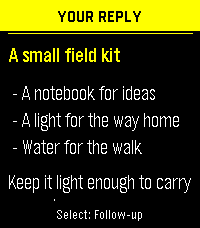
Ask from your Pebble or type on Android. Choose the answer model, search service and speaking voice separately. Read the short reply on your wrist; keep the full conversation, formatting and sources on your phone.
Watch use needs Android 8 or later, both apps below, and your usual paired Pebble phone app.
0.11.0-agent-dev · build 13 · debug APK
Checksum
1.9.0 · PBW
Checksum
Install Android from the APK. The watch app is also in the Pebble Store.
Hosted answers and voices need your own keys and service credit, and may cost money.
Set up
- Install the APK on Android. Open the PBW with your paired Pebble phone app.
- In Settings → Answers, choose a provider and model, add your key, then select Save answer setup.
- Under Settings → Watch, choose your phone app and watch. Open Dick Tracy Watch on the watch and press Select to speak.
Your question sends as soon as Pebble dictation ends. To check it first, choose Send: Review first in the watch menu. Back cancels. You can also type on the phone.
What’s in this download
These details describe Android 0.11.0-agent-dev (build 13) and watch 1.9.0. It adds imported skills, MCP connections, profiles and optional computer tasks alongside chat, history, provider tools and speech.
Skills, MCP connections and agent profiles
In Skills, import a SKILL.md, ZIP, pasted instructions or HTTPS file. Review its source and hash before import. Selected instructions and linked text references become context for the profile, up to 32 KiB on Android. Imported scripts do not run on the phone.
In Connections, add an HTTPS MCP server using Streamable HTTP or legacy SSE. Test connection discovers tools, resources and prompts without executing a tool or calling a model. Select the tools to expose. Manual Run and attach result works with any answer source; automatic calls require a supported model adapter and Tools enabled.
Calls ask for Allow once, Allow for this profile, or Deny. Grants bind the profile, connection and tool revision; changing a connection requires discovery again. Phone requests allow three custom calls and three rounds, with a 16 KiB limit per result. A permission prompt can wait up to five minutes. Cancelling cannot undo an action already sent to a server.
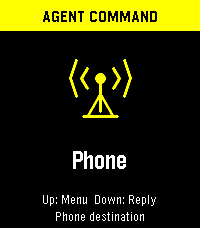
Use Profiles to combine skills, connections and an answer setup. Pin up to five on the watch. Its Agents menu selects one; the Command screen shows Phone or Host before you record. Small phone-tool approvals can be reviewed on the wrist; complex arguments and host approvals stay on the phone.
Optional computer host and source code
Pair a computer in Connections → Pair a computer, then create a background profile from its permitted host profiles. A task runs through a separately signed-in Codex CLI 0.160.0 on your computer. The host requires subscription authentication and has no model API fallback. It does not use the phone’s provider keys.
The host needs Python 3.12+ on macOS, Linux or WSL2 and an HTTPS address reachable from your phone. Configure workspaces, skills and MCP tools in its terminal. Installation does not create a service. The computer must remain running for tasks to continue.
Tasks keeps results and pending decisions. Back on the watch leaves a task running; Cancel task requires confirmation. Reopening a result does not start speech. Use Watch voice or Listen when you want it read.
Host setup and test guide · Host 0.1.1 wheel · Host source · Full source ZIP · Checksums
Source revision 06d5502, MIT license. Phone-to-host execution and a controlled MCP approval have been tested. The complete wrist-to-host approval/reconnect flow and third-party MCP sign-in still need setup-specific checks.
Android chat, history and watch controls
- Chat without a watch. Type a question, cancel a request, ask follow-ups or start a new conversation. Failed questions have an Edit question action so you can change the wording and retry.
- Read the full answer. Android renders selectable Markdown, clickable citations, a Sources list and a label showing the tools used. Gemini’s search suggestions appear when returned by the provider.
- Keep and resume conversations. History stores up to 200 question/reply records, newest first, with the provider and model identified. Open an old reply to read or listen, or choose Continue this conversation. Delete all removes history and keeps provider settings and keys.
- Use the watch buttons. Select starts dictation or a follow-up; Up at home opens Menu; Up/Down scroll the reply; Back cancels or returns home. Hold Select to mark the full reply for the phone, then tap Open full reply from watch in Android.
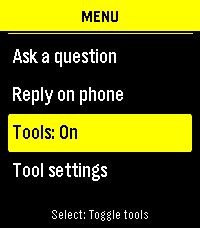
- Choose how the watch behaves. Menu has New conversation, Send: Review first, normal/larger text, Tools On/Off and voice controls. Sending mode and text size persist. Tools changes wait for the phone’s confirmation.
- Keep reading. The Android screen stays awake while the app is visible. The watch keeps its backlight on while the watchapp has focus.
Pebble handles dictation, including when recording stops. The companion receives the transcript; it does not record phone audio or provide a continuous voice session.
Answer providers, model IDs and setup checks
Settings → Answers supports OpenAI, Anthropic, xAI, Gemini, OpenRouter, Runware, Hugging Face, Mistral, Cohere, Ollama Cloud and Kimi, plus a custom HTTPS endpoint compatible with Chat Completions.
- Enter a model ID or choose a preset. Each provider keeps its own key, model and tool selection, so switching providers restores that setup.
- Custom endpoints use an HTTPS base URL ending in
/v1. Runware uses AIR model IDs; OpenRouter and Hugging Face use their provider/model identifiers. Ollama Cloud connects to the hosted service. - Anthropic has an optional
wrkspc_…workspace-ID field for keys that require one. - Replace or remove a provider key without deleting conversations or other providers’ keys. Links in Answers open the corresponding provider account page.
- Check saved setup runs a short request against the saved provider/model, with tools off, and adds nothing to History. It checks the answer route, not search or speech. Hosted checks may use credit; a local check runs on the phone.
Hosted answers use your API account. A ChatGPT, Claude or other consumer subscription may not include API credit. Model and tool availability depend on the service and your account; the app does not silently switch providers when a request fails.
Local models: Gemini Nano and imported LiteRT models
On phone · Gemini Nano uses Android AICore where supported. Answers settings can check availability and request Android’s system-model download when offered. Nano requires this companion to stay on screen; it cannot answer a watch request with the phone app in the background.
On phone · Gemma offers a resumable 2.59 GB / 2.41 GiB Gemma 4 E2B download from Hugging Face LiteRT Community. The app verifies the pinned file size and SHA-256 before use. No provider account is needed. The download starts only after confirmation and defaults to an unmetered network.
You can instead import a portable GPU/CPU .litertlm model. The importer checks the file type, size, free space and phone memory; compatibility still needs a successful setup check. Imported models are not treated as verified copies of the bundled download. Each app keeps its own private model files, excluded from backup.
Cancel a download/import or remove local model files in Answers without deleting chats or cloud keys. Initial loading can be slow, and Android may stop background work. Local inference never falls back to a hosted model. Optional web search, hosted speech and Pebble dictation have separate network requirements.
Provider tools: search, page reading, calculations and maps
In Settings → Tools, choose a search service and capabilities, enable tools, then select Save tools. Tools start off and are saved per answer provider. The watch’s Tools switch enables or disables that saved selection for new questions.
- OpenAI
- Web search and page reading as one option; hosted calculations.
- Anthropic
- Web search, separate Read links, hosted calculations.
- xAI
- Web search and page reading, X search, hosted calculations.
- Gemini
- Google Search, URL context, hosted calculations, places/maps on supported models.
- OpenRouter
- Web search, Read links, current date/time using the phone’s time zone.
- Mistral
- Web search and hosted calculations through its Conversations route.
- Ollama Cloud
- Standalone web search and fetching public HTTPS links from the question.
- Kimi
- Search Pro and fetching public HTTPS links from the question.
- Other answer sources
- Runware, Hugging Face, Cohere, custom endpoints and both local models can use a separate search service below.
Separate search: choose OpenAI, Ollama Cloud or Kimi to retrieve evidence for any answer provider. For example, Search: Ollama Cloud → Answer: Cohere sends the new question to Ollama Cloud, then gives its excerpts to Cohere. Save the search service’s key in Answers first. This also works with local answers, but sends the question to the selected search service.
With most built-in tools, the model decides when a tool is useful. Standalone Ollama/Kimi search and separately selected search run before answering each new question when enabled. Read links uses URLs supplied in the question. Source links and a Used label appear on Android; the watch shows a source count. Reopening History does not repeat the search.
Advanced settings → Search budget offers 1–3 calls where supported. This is not a spending cap: some providers control internal calls themselves, and search or code execution can have separate charges. Calculations run on the provider’s servers. Places/maps uses the place named in your question; the app does not request your location. Unsupported tool choices are reported before saving.
TTS services, voices and automatic watch playback
Settings → Listening chooses speech independently of answers. Every answer source can use any of these speech services:
- ElevenLabs
eleven_flash_v2_5: Darian, Talia, Eldrin and Jade presets, or a 20-character voice ID from your account. Library voices need an eligible API plan.- OpenAI
gpt-4o-mini-tts: Cedar, Marin, Alloy, Ash, Ballad, Coral, Echo, Fable, Nova, Onyx, Sage, Shimmer and Verse.- Runware
inworld:tts@1.5-mini: Dennis, Claire, Graham, Priya, Veronica and Hamish.- Mistral
voxtral-mini-tts-2603: Jane Neutral.- Android offline
- Installed offline voices from your Android speech engine. Settings links let you manage the engine, install voice data and adjust sound.
Choose Slower (0.8×), Normal (1×) or Faster (1.2×). Test voice previews the shown voice/speed; save the selection to use it for replies. ElevenLabs has its own key. OpenAI, Runware and Mistral speech share that service’s saved answer key. Hosted testing and playback use credit.
Phone: tap Listen beside a current or saved answer. Long replies are synthesized in chunks and play through Android’s current audio output. Listen moves playback off the watch. Stop reading/Stop audio cancels it, and leaving the Android app stops phone playback.
Watch: enable Experimental watch voice for compatible speaker firmware on Pebble Time 2 or Pebble 2 Duo. The phone generates the full answer using the same saved voice and sends buffered 8 kHz mono PCM audio to the watch. No voice model is installed on the watch. Other watches retain text replies.
Auto-read watch replies starts off. Turn it on in Listening or in the watch menu to automatically speak replies to new watch questions; doing so also enables watch voice. Phone questions do not start watch playback. Turn Auto-read off to keep manual Watch voice available. Select or Back stops watch audio; hold Select to hand the reply to the phone. Watch mute is respected, and the written answer remains available if audio fails.
Watch speech is experimental. Full replies can have pauses between buffered sections, and the watch speaker limits clarity. Speech works on my setup; voice quality depends on the watch, firmware and service.
Data handling, size limits and timeouts
- Storage: keys and conversations use AES-256-GCM with an Android Keystore key. Backup is disabled. History keeps at most 200 question/reply records and trims older records to keep serialized storage within 7 MiB. Uninstalling removes the saved data.
- Conversation context: requests include up to ten completed exchanges from the same conversation, provider, model and endpoint, within a 48 KiB history budget. Switching providers does not send the previous provider’s conversation context.
- Inputs: phone questions allow up to 8,000 UTF-8 bytes; watch transcripts allow 400. Local-model context has a separate 6,000-byte input limit, including instructions and conversation history.
- Outputs: hosted reply text is capped at 16 KiB. Watch text is limited to 900 UTF-8 bytes, including any source note; longer replies point to the phone. Speech uses the full saved answer, not the short watch text.
- Deadlines: ordinary answers have a 60-second deadline; answers with tools have 90 seconds for retrieval and the answer together. Provider work already performed can remain billable after cancellation or timeout.
- Network disclosure: the answer provider receives the question and relevant context. An explicitly selected search service receives the question; hosted speech receives the reading text. Android offline speech stays local. Your Pebble phone app handles dictation under its own settings.
Temporary speech files are deleted after playback or cancellation. The companion collects no sensor readings or location and records no phone audio. This download page has no analytics.
Upgrading from Gadget Watch
Install the Android update first; your settings and conversations carry over. Then install the new Pebble app. You can remove the old watch app after the new one connects. Existing Gadget download links still work.